Accept Payment — take a card payment
Charge a patient's invoice on a connected card terminal. (Setting a terminal up is a
one-time job — see Accept Payment — connect a card terminal.)
Take the payment
- Open the patient's invoice.
- Go to the Payment Method tab.
- Pick the card brand (Visa / MC, Amex, …) and enter the amount.
- Press Pay and choose Terminal.
- Pick the terminal — your default terminal is already selected — and confirm.
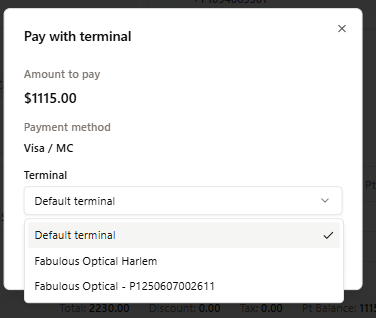
- The amount goes to the device. Hand it to the customer to tap, dip, or swipe.
- Keep the screen open — it waits for the terminal (this can take up to a couple of
minutes). When the card is approved:- the invoice balance updates automatically,
- the payment appears in the invoice's payment history with the card type and last-4.
If the card is declined or the terminal times out, you'll see why — just try again.
Refunds & voids
- Void — cancel a charge from today that hasn't settled yet.
- Refund — return money for a charge that has already settled. If a void is no
longer possible, SightHub tells you to use Refund instead.
If a payment won't go through
- Nothing happens / "gateway not set" — the store's payment gateway isn't switched
on yet; ask your admin (see the connect guide). - Terminal offline — make sure the device is on and connected, then retry.
- No terminal to pick — the terminal may be inactive or not connected yet — see
Accept Payment — connect a card terminal.