History & Chief Complaint
Two tabs cover everything you type about the patient's background and why they're in the chair today: History and Cc hpi.
History tab
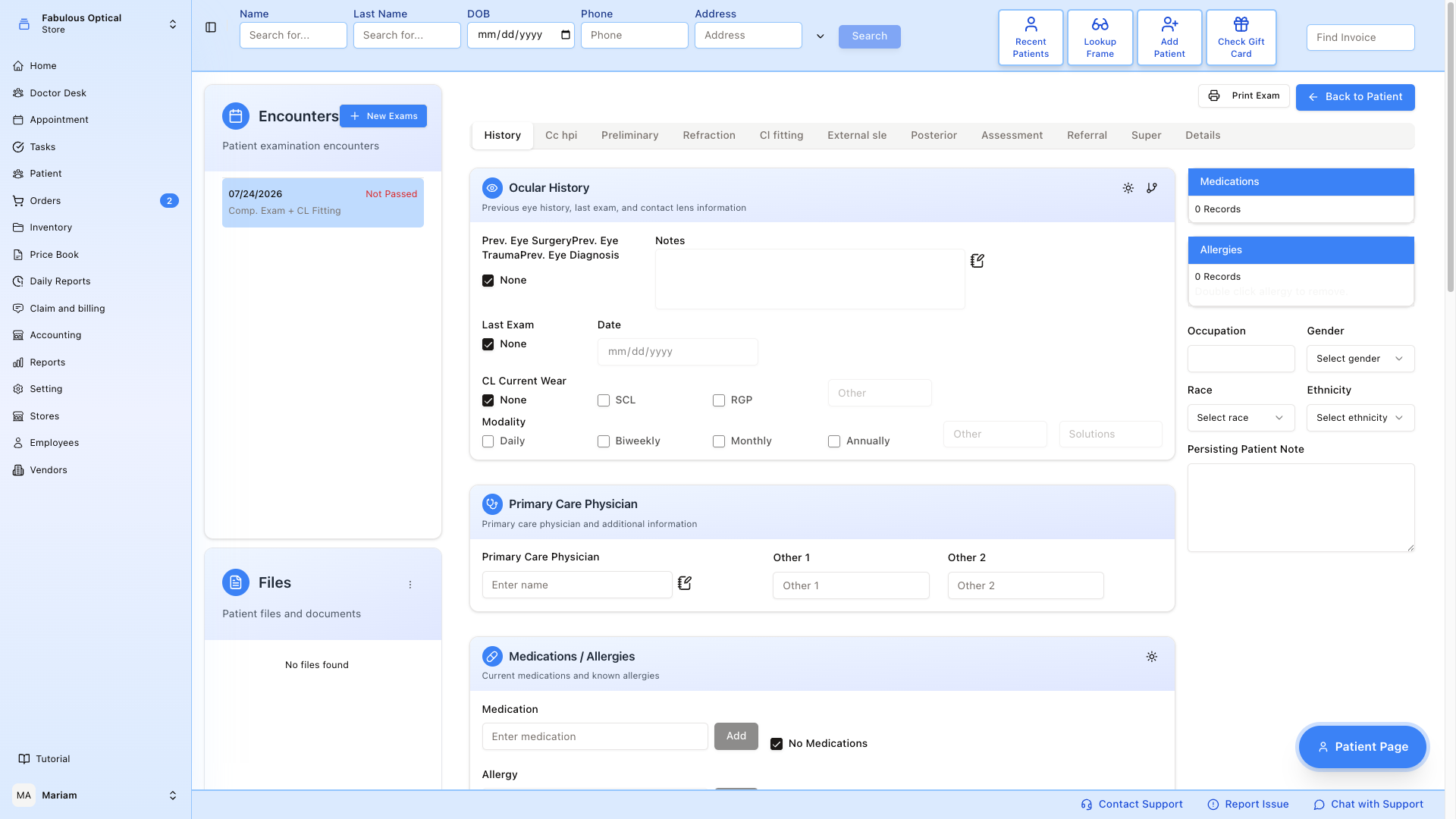
The History tab is a big form of every background section the doctor might touch. There is no Submit button: the tab saves itself when you click another exam tab or press Back to Patient, and if you changed something a message such as History has been updated confirms it. See How saving works on the exam overview.
Ocular History (top)
Prior eye surgery, prior eye trauma, prior eye diagnosis (Prev. Eye Surgery, Prev. Eye Trauma, Prev. Eye Diagnosis). Tick None if the patient has nothing to report — the Notes box then empties, shrinks and greys out. Otherwise the Notes box beside it is wide and tall, so there is room for a real history. The small sun icon in the Ocular History header ticks all three None boxes (eye history, Last Exam, CL Current Wear) at once.
Last Exam — date of the patient's most recent eye exam (elsewhere). Tick None if this is their first.
CL Current Wear — do they currently wear contacts? Tick None if not. If yes, tick SCL (soft) or RGP (rigid gas permeable) or fill Other. Then pick Modality (Daily / Biweekly / Monthly / Annually / Other) and note their Solutions.
Primary Care Physician
Name of the patient's PCP + two optional fields for additional physicians (specialist, urgent care, etc.).
Medications / Allergies
Two search boxes in the Medications / Allergies card: Medication and Allergy. Type at least three characters and suggestions from the drug catalogue appear. Clicking a suggestion adds it straight away. For something that is not in the list (for an allergy: peanuts, latex), type it and press Add (or Enter). If the patient takes nothing, tick No Medications; for allergies the tick is No Known Allergies. The small sun icon in the card header ticks both at once.
Allergy details for e-prescribing (optional) opens extra fields for an allergy — Reported by, Type, Severity, Reaction, Product, Product code and Code system. Fill them before you add the allergy; they go to the pharmacy with every e-prescription. Product code and Code system must be filled together or not at all.
The See Scanned Documents Folder and Leading Wildcard ticks at the bottom of the card are saved with the tab. Leading Wildcard does not change how the search boxes here work.
Medications and allergies are saved the moment you add them — they do not wait for you to leave the tab. What you add appears in the Medications and Allergies lists in the right-hand column. To remove one, double-click it in that list.
Below this card, in order, come ROS / Medical History, Family History, Social History, GMO and a Note box. They are all on this same tab — scroll down to reach them. The tab row stays pinned to the top while you scroll, so you can move on from the bottom of the page.
The sun icons on these cards fill in the usual answers in one click: on ROS / Medical History every system is set to No and its text is cleared; on Social History alcohol and tobacco are set to None; on GMO the four questions are set to Yes. These three sun icons also save the History tab straight away.
Right-hand column
Occupation, Gender, Race, Ethnicity and the Persisting Patient Note sit in the right-hand column under the medication and allergy lists. They are saved together with the rest of the History tab when you leave it.
Cc hpi tab
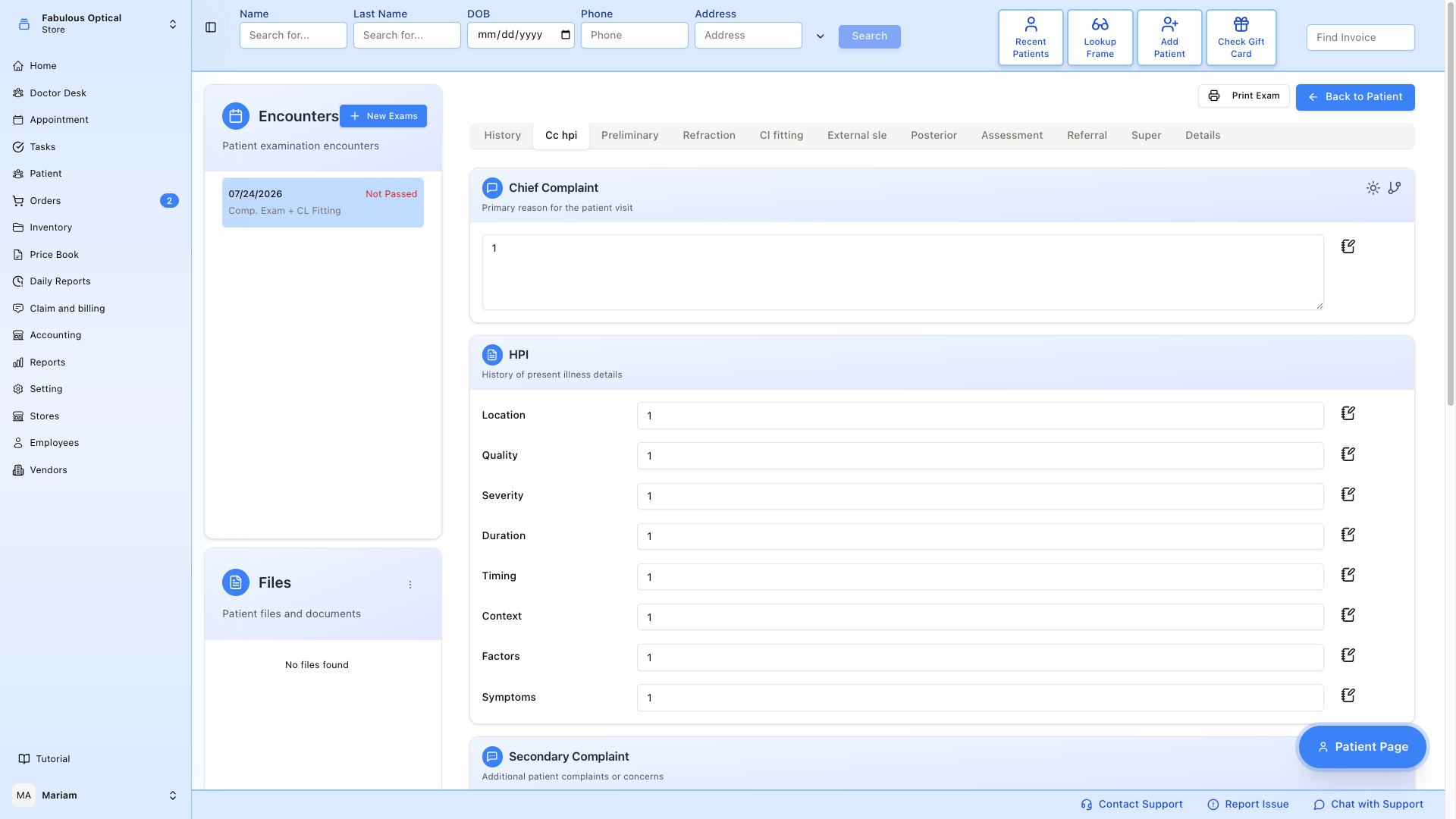
The Cc hpi tab (chief complaint and history of present illness) is where you write the story of this visit. From top to bottom:
- Chief Complaint — one line: "blurred distance vision for 2 months" / "annual eye exam" / etc.
- HPI (History of Present Illness) for the chief complaint.
- Secondary Complaint — anything else the patient mentioned.
- HPI for the secondary complaint.
- Note — anything else.
The two HPI blocks have the same free-text fields — Location, Quality, Severity, Duration, Timing, Context, Factors, Symptoms. The first belongs to the chief complaint; the second, below Secondary Complaint, belongs to that. They are not two formats of the same thing.
Like History, this tab saves itself when you leave it (the message reads CCHPI has been updated, or CCHPI has been created the first time).
Printing it
Print History at the bottom of the History tab produces the medical history on its own, without going through the exam-wide Print Exam picker. It prints the saved history — if you have just typed something, click another tab first so it is saved, then come back and print.
Good to know
- Copy from a previous visit fills the form but does not save it on the spot. It is saved when you leave the tab, like anything you type. It replaces the whole tab: sections you did not tick come out empty, so copy first and type afterwards. See Copying from a previous visit.
- Leaving by another route loses the changes. Clicking a different exam in Encounters or using the main menu does not save the open tab — click another exam tab first.
- Saved phrases. Many boxes on both tabs have a small notebook icon. It opens a list of saved phrases for that box — click one to put it in, or Manage Notes to edit the list.
- Locked exam. On a locked exam the tab shows Exam is passed — changes are not saved, and medications and allergies can no longer be added or removed.