Recall list
The Recall List is your daily worklist of patients you (or the doctor) flagged for a phone call or a repeat visit. When a patient is due for their annual exam, needs a follow-up call about a contact lens fitting, or should be reminded to pick up their glasses — they show up here.
Open Patient in the sidebar → Recall List tab.
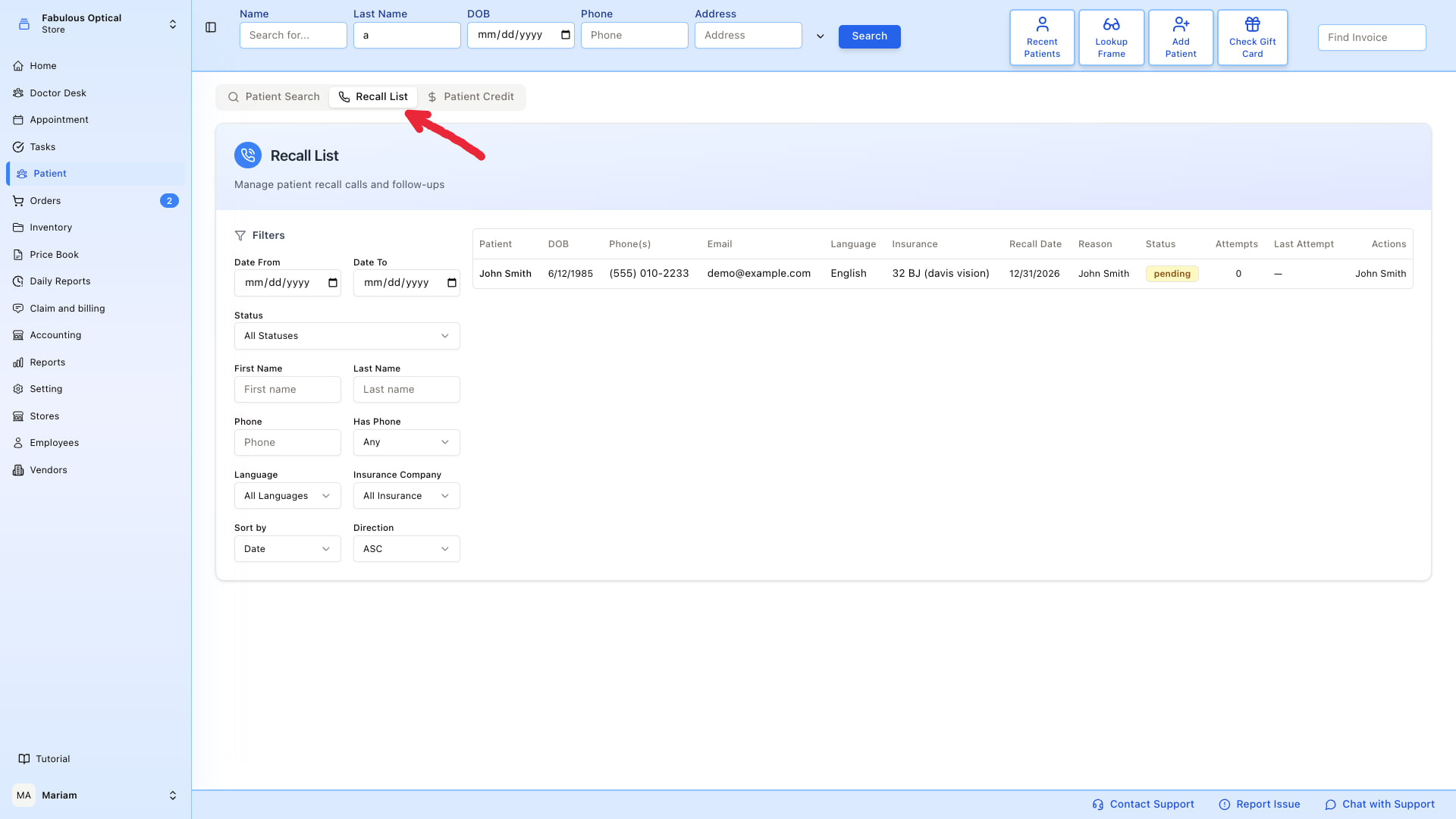
What you see
The left panel is filters, the right panel is the recall table.
Each row is one recall and shows: Patient · DOB · Phone(s) · Email · Language · Insurance · Recall Date · Reason · Status · Attempts · Last Attempt · Actions.
Attempts and Last Attempt are the ones that make it a working list rather than a wish list — they tell you at a glance who has already been rung three times and who nobody has touched.
Click the patient's name to open their patient card. The table shows 25 recalls a page; Prev / Next below it move between pages.
Filters
Filters apply as soon as you change them — there is no Search button.
- Date From / Date To — narrow to recalls due in a range (e.g. this week).
- Status — All Statuses, Pending, Reached, No Answer, Unreachable, Rescheduled.
- First Name / Last Name / Phone — find one patient in a long list.
- Has Phone — filter out patients with no phone on file (calling them isn't going to work).
- Language — show only patients who speak a given language, useful if you have staff for specific languages.
- Insurance Company — narrow by insurance.
- Sort by (Date or Patient Name) / Direction (ASC or DESC) — order results (default: recall date ascending, so oldest first).
Typical workflow
- Set Date To to today to see everyone due today or earlier.
- Filter by Language if you have a specific caller for that language.
- Work down the list. After each call press Log Call on that row.
- If the call turns into a booking, jump to Book an appointment for that patient.
Logging a call
Log Call on a row opens Log Call Result for that patient. Pick the Result Status — No Answer, Reached, Unreachable or Rescheduled — add a Note if it is worth recording, and press Save Result.
Choosing Rescheduled reveals a Reschedule Date field, and it must be filled in before the result will save.
This is the only way to move a recall along: the Status column does not change by itself, and the Attempts counter only goes up when a call is logged here.
Where recalls come from
Recalls are created from inside the patient's card — see the Recalls button (phone icon) on the Basic Information widget. Set a reason (e.g. "annual follow up"), a date, and the location; the recall then appears in this list with that date under Recall Date. See Create a recall from the patient card.