Measurements — Preliminary, External SLE, Posterior
Three tabs collect every measurement the tech or doctor takes during the exam. None of them has a Submit button — each tab saves itself when you click another exam tab or press Back to Patient. See How saving works.
Preliminary tab
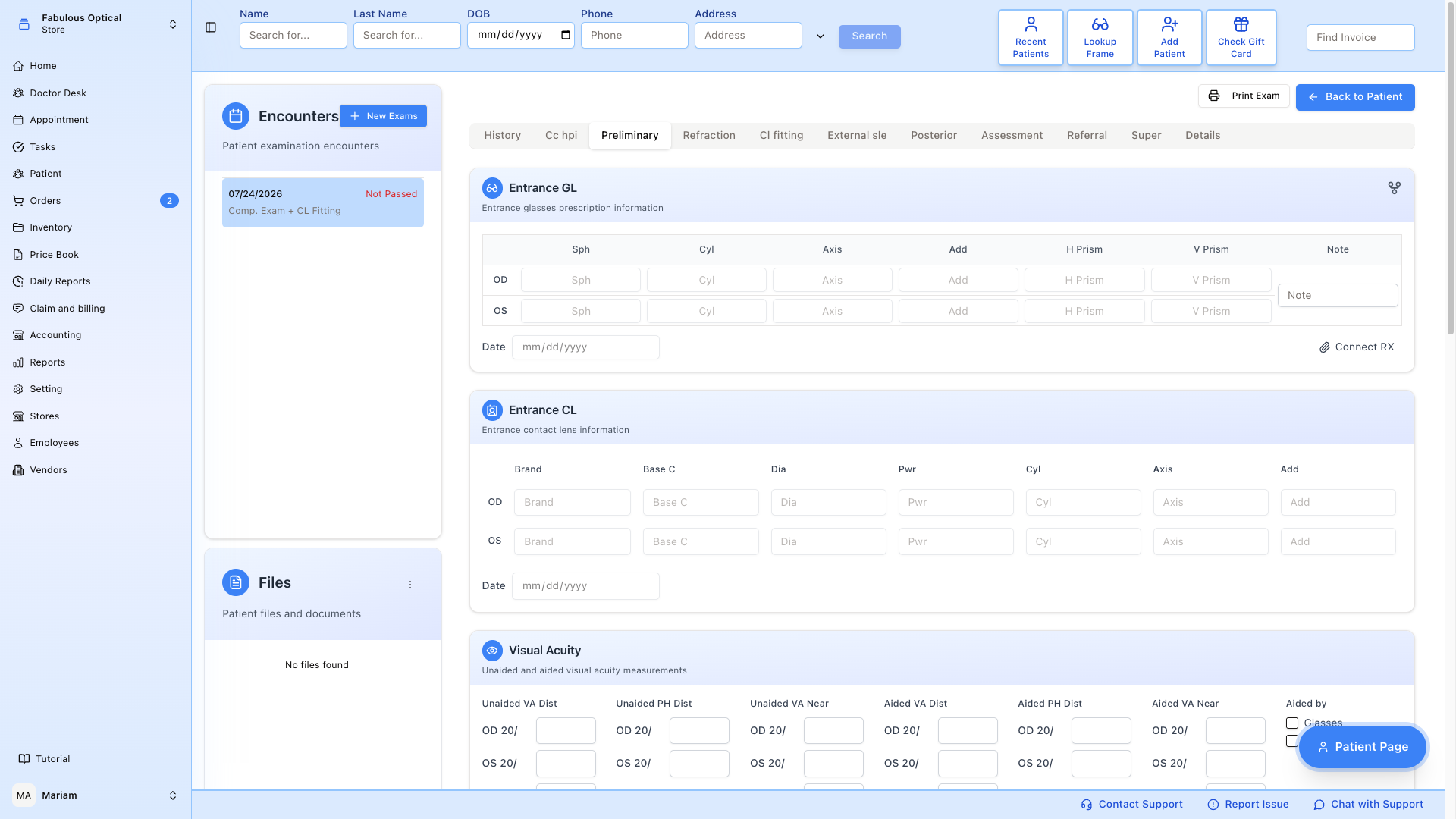
The tech (or doctor) fills this before the doctor sees the patient. From top to bottom:
- Entrance GL / Entrance CL — the Rx the patient walked in with (glasses and/or contacts). You cannot type in these tables. Press Connect RX under Entrance GL and pick a glasses Rx and/or a contact lens Rx from the patient's saved prescriptions. That choice is saved at once and the tab reloads, so connect the Rx before you type anything else on the tab. The small note box beside Entrance GL shows the note of the connected Rx; changing it here is not saved.
- Visual Acuity — unaided and aided (with current Rx), OD / OS / OU, distance and near.
- Confrontation, Pupils & Motility — confrontation fields, motility, and pupil readings for each eye under Dim and Bright.
- Color Vision & NPC — colour vision, the distance and near cover tests, the NPC (near point of convergence) test and Bruckner.
- Amsler Grid & Von Graefe Phoria — macular grid test, distance and near Von Graefe phorias, plus stereo vision, Worth 4 Dot and fixation disparity.
- Near Point Testing — phorias, vergences and accommodation (binocular function). This block starts collapsed; press + to open it if you need it.
- Autorefractor · Auto Keratometer — machine readings, typed in by hand. There is no import from the device.
- Blood Pressure · Iris Color — quick notes. The blood pressure entered here is also offered to the Ocular Perfusion Pressure calculator on External SLE.
There is one Note card at the bottom of each tab for anything the numbers don't capture.
Shortcut: on many OD / OS rows (here, and on the Findings, Visual Fields and Cup / Disc Ratio cards of the other two tabs), clicking the OD or OS label copies the value from the other eye into an empty box; on Visual Acuity, clicking OU copies the OD value. It never overwrites a box that already has a value.
When you leave the tab after changing something, a message such as Preliminary has been updated confirms the save.
External SLE tab
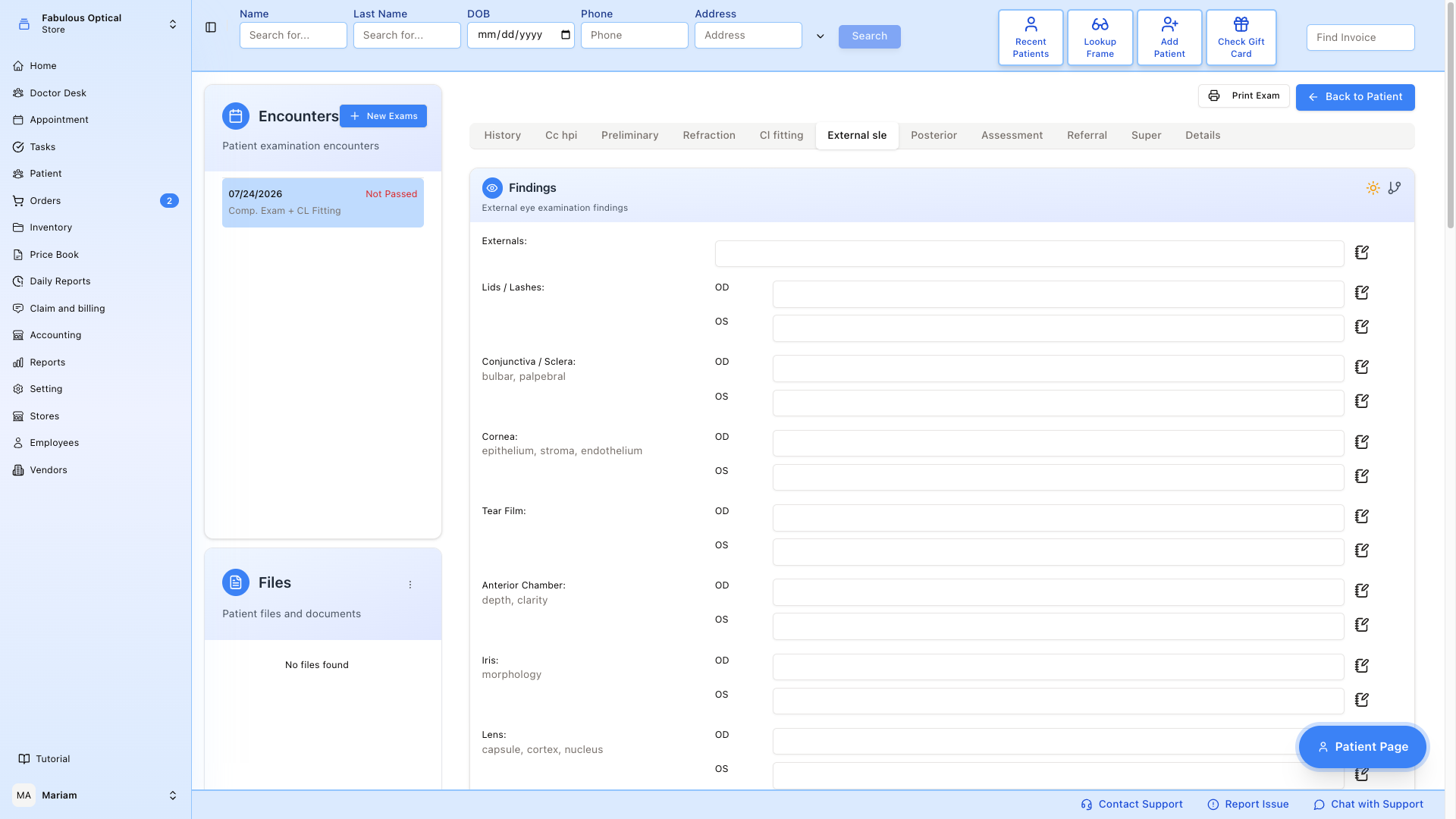
Everything the doctor sees with the slit lamp plus IOP. From top to bottom:
- Findings (the slit lamp exam) — externals, lids/lashes, conjunctiva/sclera, cornea, tear film, anterior chamber, iris, lens.
- Drawing Pad — free-hand sketch pad for cornea/lid diagrams. The Posterior tab has one too.
- Gonioscopy — angle grading (for glaucoma workup).
- Tonometry — pressure readings (see below), with a table of saved readings and a Pressure Chart beside it to see the trend across visits.
- IOP Drops — which drops the patient is on for pressure.
- Ocular Perfusion Pressure — a calculator, see below.
- Visual Fields — VF perimetry results.
- Note.
The drawing is required here
External SLE cannot be saved for the first time without a drawing. If this exam has no saved drawing yet, the pad is empty, and you changed something on the tab, then leaving the tab stops with Drawing is required. Please draw something before submitting. — and you stay on External SLE. Draw something on the pad, then click the next tab again.
Once a drawing has been saved for this exam, the rule no longer applies. If you did not change anything on the tab, you can leave it freely.
Adding a tonometry reading
- Pick the Type — NCT, Goldmann, ICare, Tonopen or Other (with Specify Other).
- Fill in Day and Time.
- Enter the OD and OS pressures.
- Press Add. This saves the whole External SLE tab right away (so the drawing rule above applies), and the reading appears in the chart.
If you picked a Type but left Day or Time empty, the tab will not save — pressing Add does nothing, and clicking another tab does not move you off External SLE. No message explains why; at most the cursor jumps to the empty box. Fill in Day and Time (or clear the Type) and try again.
Ocular Perfusion Pressure
A calculator card for the blood supply to the optic nerve. It shows:
- Systolic BP and Diastolic BP — if empty, they are filled in from the blood pressure on the Preliminary tab.
- IOP OD and IOP OS — if empty, they are filled in from the tonometry you are typing now, or else from the latest saved tonometry reading.
- MAP — mean arterial pressure, worked out for you (grey, you cannot type in it).
- OPP OD and OPP OS — the result for each eye in mmHg, in a coloured box:
- green Normal — 43.9 and above
- amber Borderline — 33.9 to 43.8
- red Low — 33.8 and below
- grey Enter BP and IOP — until both are filled in.
The formula is printed on the card: MAP = DBP + ⅓ (SBP − DBP), and OPP = ⅔ × MAP − IOP. The colour bands are for education only — the card itself says they are not diagnostic thresholds or treatment targets.
You can overwrite any of the four input numbers by hand. They are saved with the rest of External SLE when you leave the tab; values already saved are not replaced by the automatic fill. MAP and OPP are always worked out again from the numbers. On a locked exam the inputs are greyed out.
Posterior tab
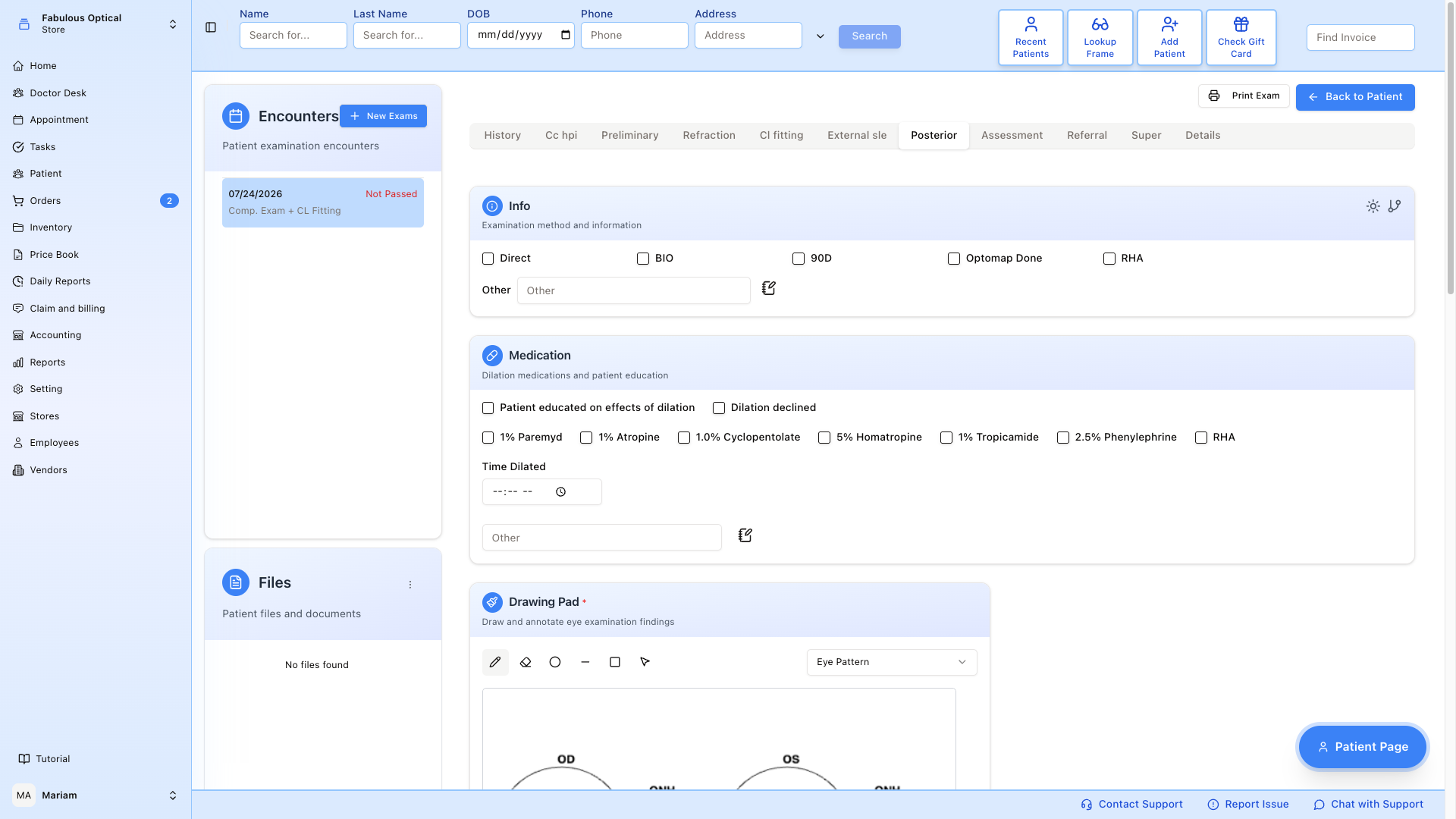
Fundus (back of the eye). From top to bottom:
- Info — how the exam was done.
- Medication — dilation drops used, time dilated, Patient educated on effects of dilation, Dilation declined.
- Drawing Pad — optional here; Posterior saves with or without one (the red star on the card title does not apply on this tab).
- Findings — everything visible on dilated exam (view, vitreous, macula, background, vessels, peripheral fundus, optic nerve).
- Cup / Disc Ratio — vertical and horizontal C/D ratio for each eye.
- Note.
Tips
- There is no Submit button. Each tab saves when you click another exam tab or Back to Patient — not while you type, and not when you click another exam in Encounters or use the main menu.
- If a save fails you stay on the tab and nothing you typed is lost. Usually an error message says why; the tonometry Day / Time case above is the one that shows none.
- The sun icon. Some cards have a small sun icon in the header — Findings and Visual Fields on External SLE, and several Preliminary cards. It fills that card's boxes with the first saved phrase for each box (a quick "all normal" if your practice has saved normal phrases). It replaces what is already typed, and a box with no saved phrase is emptied. On the Posterior tab the sun icons do nothing yet.
- Some fields have a small notebook icon. That is not a drawing tool — it opens a list of saved phrases for that field, which you can insert with a click, and add to or edit. The free-hand drawing pads are separate, full-width panels on the External SLE and Posterior tabs.