Refraction — the glasses Rx
The Refraction tab is where the doctor works out the glasses prescription. It reads down the page in the order the tables appear: Retinoscopy → Cyclo → Manifest → Final, then the collapsed Addition Finals and the Dr. Note.
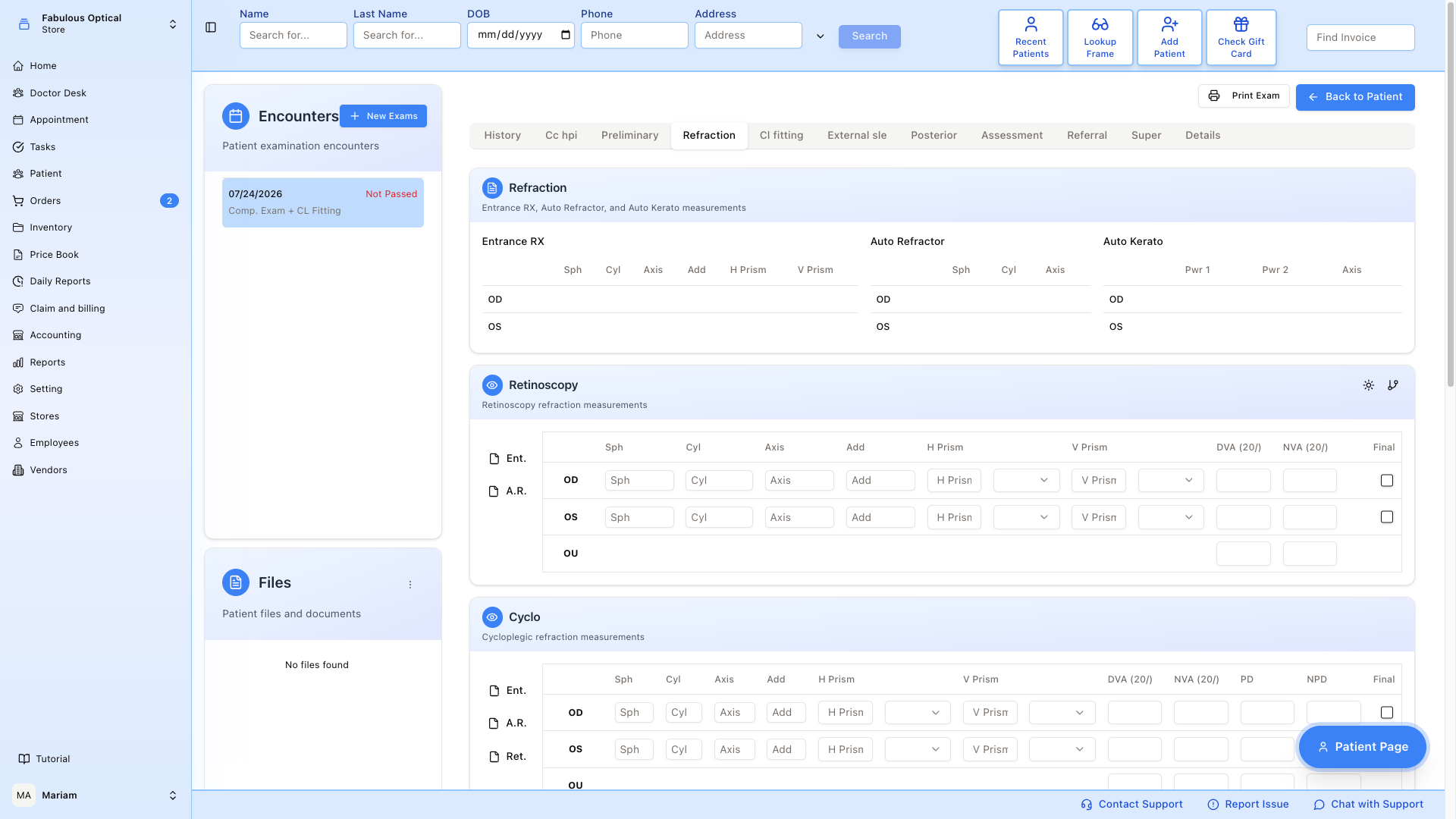
Reference row (top)
A read-only Refraction card at the top shows three small tables side by side — what the patient walked in with. You cannot type in them.
- Entrance RX — the glasses Rx the patient is currently wearing (Sph, Cyl, Axis, Add, H Prism, V Prism). It is the same glasses Rx the Preliminary tab shows as Entrance GL.
- Auto Refractor — the machine reading (Sph, Cyl, Axis).
- Auto Kerato — corneal curvature reading (Pwr 1 / Pwr 2 / Axis).
These come from what was already recorded earlier in the exam; if the tech left them empty, they are empty here too.
Retinoscopy
Doctor's rough starting point. There is a row for OD and a row for OS, plus an OU row that only takes the two visual acuities. Columns: Sph · Cyl · Axis · Add · H Prism · V Prism · DVA (20/) · NVA (20/). Each prism has a small direction picker next to it (BI / BO for horizontal, BU / BD for vertical).
The Final tick box on the right copies that eye's numbers straight into the Final table below. Cyclo and Manifest have the same tick box; ticking one eye in one table unticks the same eye in the other two, so only one row per eye is "the one carried into Final".
Ent. and A.R. on the left are buttons, not rows. Each one overwrites the whole retinoscopy table for both eyes and saves the Refraction tab immediately, so press them before you have typed anything rather than after. Ent. copies the Entrance RX. Despite the name, A.R. does not bring in auto-refractor readings — it clears sphere, cylinder and axis and copies only the Add from the Entrance RX.
The small branch icon in the Retinoscopy header opens the copy-from-an-earlier-visit window — see below.
Cyclo / Manifest / Final
Same table layout, one section per stage of the refraction:
- Cyclo — refraction under cycloplegia (dilated pupils).
- Manifest — dry (non-dilated) subjective refraction.
- Final — the Rx you are actually giving the patient.
Cyclo and Manifest add PD and NPD columns. Final has PD and NPD too, but instead of the Final tick box it has an Expiration date with 1 year and 2 years buttons that fill it in, and a Note line under the table.
Fill any subset — SightHub doesn't force you to enter every stage.
Cyclo, Manifest and Final have the same quick-fill buttons on the left — Ent., A.R. and also Ret. (copy sphere, cylinder, axis, add and prisms from the Retinoscopy table). Like on Retinoscopy, each one replaces that table for both eyes and saves the tab at once. Everything else in that table is emptied too — the acuities, PD / NPD and, on Final, the Expiration and the Note — so press them first and type the rest afterwards.
Copy from an earlier visit
The branch icon in the Retinoscopy header opens Copy from Refraction History. Pick one of the patient's other encounters on the left, tick the sections you want (Retinoscopy, Cyclo, Manifest, Final, Final 2, Dr. Note — or Select All) and press Copy.
Copying replaces what is on the tab with what you picked — sections you leave unticked come out empty — so copy first, then type. The copied values are saved like any other change, when you leave the tab.
Dr. Note
Free-text field at the bottom for anything Rx-related the numbers don't capture (e.g. "PATIENT WANTS PROGRESSIVES", "TRY 0.25 LESS CYL IF NOT TOLERATED"). The notebook icon next to it opens a list of saved phrases — click one to put it in the field, or Manage Notes to edit the list.
Saving
There is no Submit button on this tab. Refraction saves itself when you click another exam tab or press Back to Patient — if you changed something, a message such as Refraction has been updated confirms it (Refraction has been created the first time). If the save fails you stay on the tab with an error message and your numbers are still there. Clicking another exam in Encounters, or using the main menu, does not save — see How saving works.
The quick-fill buttons (Ent., A.R., Ret.) are the exception: they save straight away.
On a locked (signed) exam the tab shows Exam is passed — changes are not saved at the bottom and does not save when you leave it. The quick-fill buttons still try to save, so leave them alone on a locked exam.
Creating the actual glasses order
The Final table here is the exam's record of the Rx. Writing the patient's actual prescription is a separate step: on the patient card use Create Rx (or, if the patient already has a prescription, Add Rx in the three-dot menu of the Last Rx card) and enter the numbers there — see Rx detail. A new Rx form opens blank apart from the doctor and location — the numbers are not copied from this tab. That prescription, not this table, is what you pick when you make a lab ticket.
There is also an Addition Finals section, collapsed by default (press + to open it), holding a Final 2 and Final 3 for when more than one prescription comes out of the visit. They have the same quick-fill buttons, a Desc field instead of PD / NPD, and their own Note line.