Assessment, Superbill & Referral
Three tabs handle the "close out" side of an exam: Assessment (what's wrong), Super (what the insurance is billed for), and Referral (who to send them to).
None of them has a Submit button. Assessment and Referral save themselves when you click another exam tab or press Back to Patient; everything on Super saves the moment you click it. See How saving works.
Assessment tab
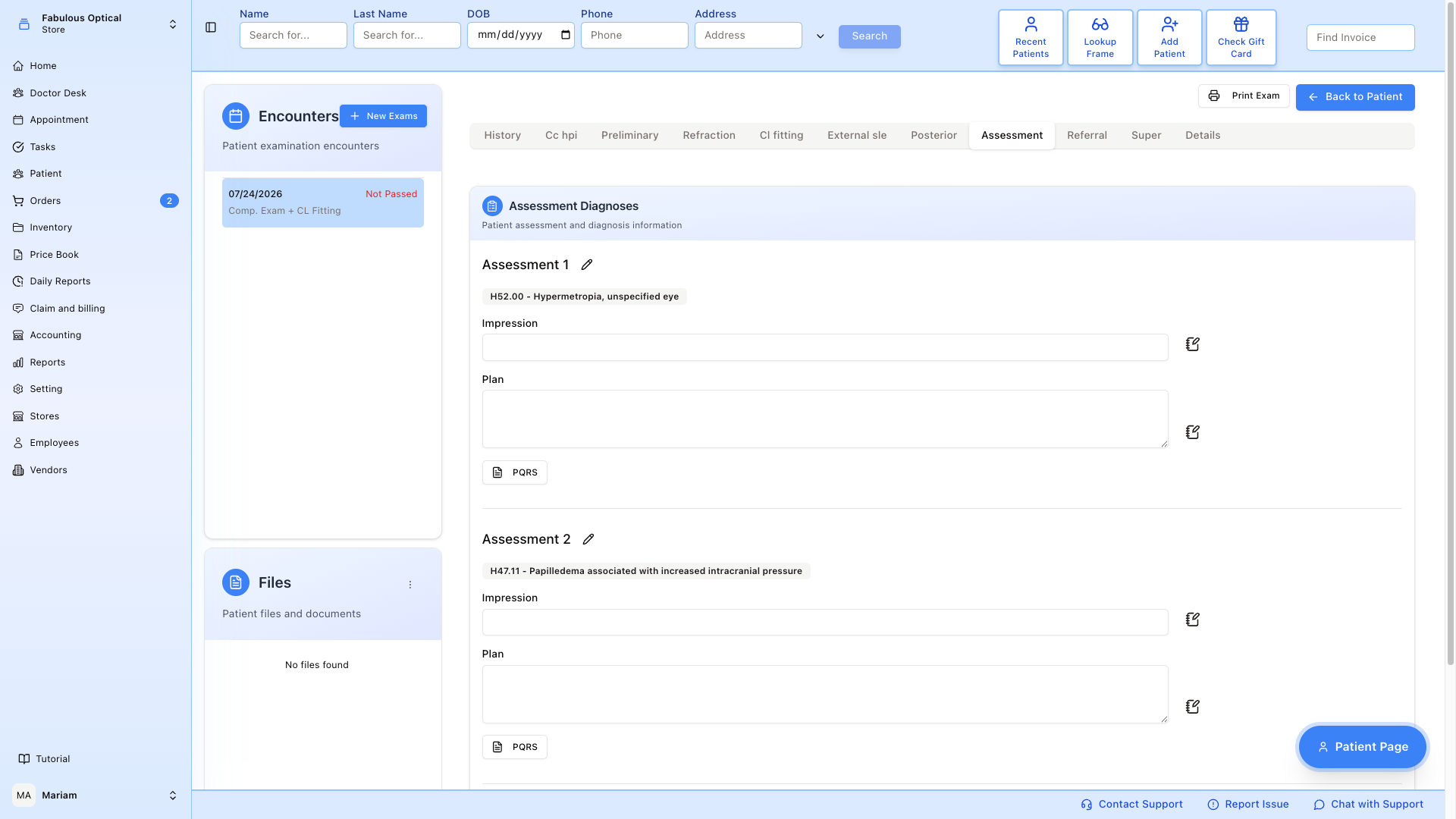
Where the doctor's diagnoses go. Everything sits in one Assessment Diagnoses card, one block per assessment (Assessment 1, Assessment 2, ...).
-
Add Assessment Diagnosis — opens a window with three helpers on the left: Used Diagnoses (already on this exam), Patient History (diagnoses from the patient's earlier exams) and Search Diagnosis (type a code or a name). Pick the ICD-10 codes you want, then press:
- Add Separate — each picked diagnosis becomes its own assessment;
- Add Combine — all picked diagnoses go into one assessment.
What you add is saved straight away. On an exam with no assessment yet, this window opens by itself the first time you open the tab.
-
Impression and Plan — what the doctor makes of it, and what they are doing about it (Rx change, follow-up in 6 months, referral). These two boxes are saved when you leave the tab (Assessment has been updated).
-
PQRS — Physician Quality Reporting System measures — the quality-of-care codes required for some payers. Each assessment has its own PQRS button; tick codes in the Add PQRS window and press Add Selected. To remove one, click its badge and then Delete.
Each assessment has a pencil menu with Edit, Clear fields and Delete. Edit opens the same window with Add to Assessment (adds the picked codes to this assessment) and Replace All (replaces its codes with the picked ones). Clear fields empties Impression and Plan on the screen; the empty boxes are saved when you leave the tab. Delete removes the whole assessment at once — there is no "are you sure?" step. To remove one diagnosis rather than the whole assessment, click its badge and then Delete.
Add the diagnoses first, then write Impression and Plan. Adding or removing a diagnosis, an assessment or a PQRS code reloads the card from the server, and Impression / Plan text you have typed but not yet saved is replaced by the saved version.
Super tab (Superbill)
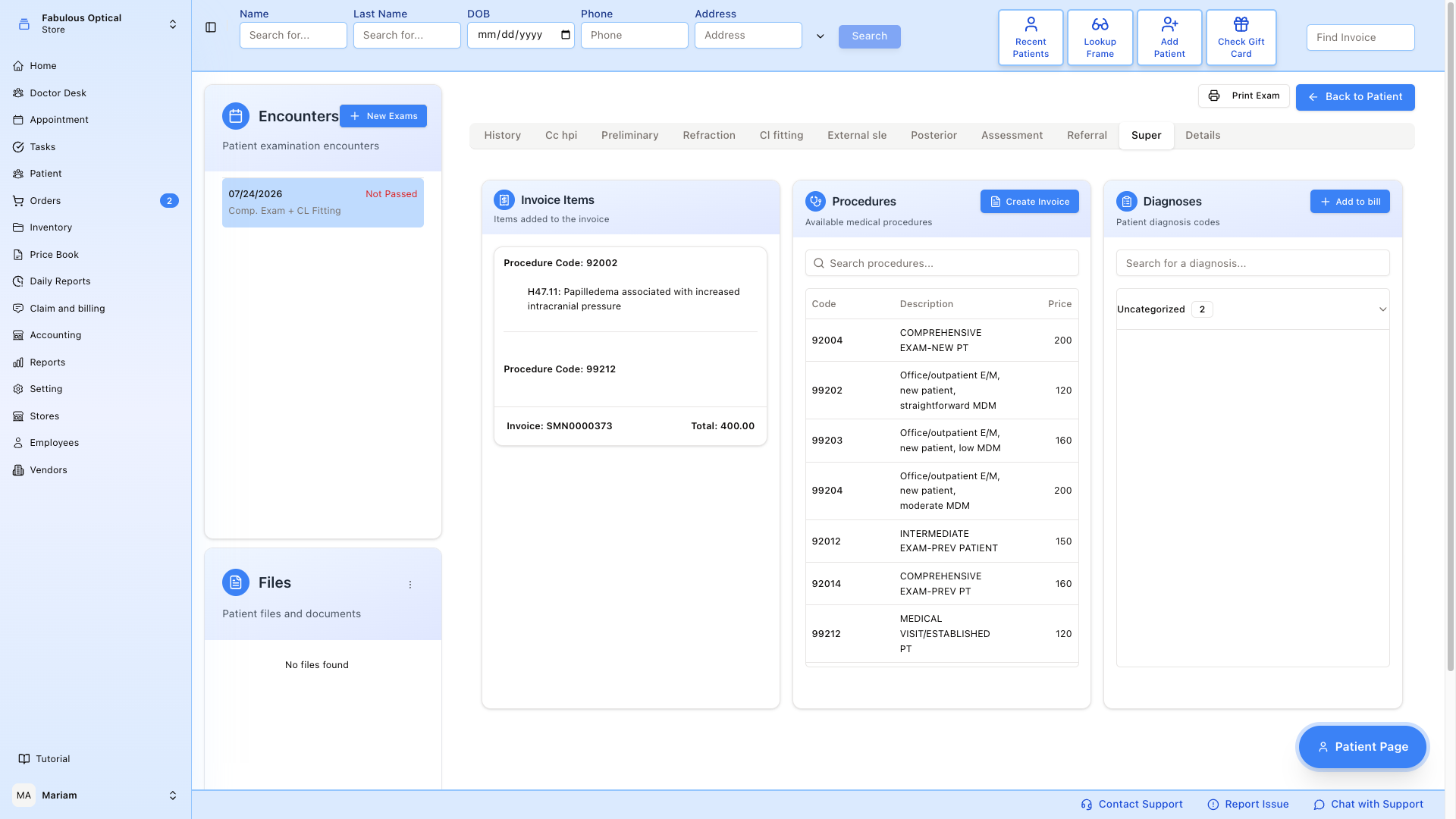
The superbill is the doctor's summary of what to bill the insurance for. Three cards, left to right:
- Invoice Items — the lines already on the bill: each procedure code with the diagnoses attached to it, plus the invoice number and total at the bottom.
- Procedures — the price list of CPT codes for what was done (comprehensive exam, refraction, VF, fundus photo, etc.), with a search box. Create Invoice sits on this card.
- Diagnoses — the diagnosis codes for this exam, with a search box. Add to bill sits on this card.
Does this visit have insurance?
A banner at the top of the Super tab answers that before you start:
- Green — Insurance: company — the visit is covered. The note after the name says where the insurance came from: (from the appointment) when the patient booked an appointment for this visit, or (from the patient's card) for a walk-in.
- Green, with an extra line — The patient has several insurances and none is marked Primary — mark one as Primary in the patient's card before creating the invoice. Do that on the patient's insurance page first.
- Amber — No insurance — a super bill can't be created. Either The appointment has no insurance. Ask the front desk to add the insurance to the appointment. or The patient has no active insurance. In that case the patient pays with a regular invoice instead.
With no insurance, Add to bill is greyed out (unless a super bill was already started for this exam) and Create Invoice is greyed out. Create Invoice is also greyed out until at least one line is on the bill.
Building the bill
Nothing reaches the bill on its own:
- Pick a procedure in Procedures.
- Tick at least one diagnosis in Diagnoses.
- Press Add to bill. The line is saved at once and appears under Invoice Items. If you forgot the procedure or the diagnosis you see Please select a procedure and at least one diagnosis. for a few seconds.
- Repeat for each line.
- When the list is right, Create Invoice turns it into the patient's invoice — it asks for confirmation first. If the server refuses (for example, no active insurance), its explanation stays on screen for about ten seconds.
To take something off the bill, click it in Invoice Items: click the Procedure Code line and press Delete Procedure to drop the whole line, or click one diagnosis under it and press Delete to drop just that diagnosis. Both happen at once, with no "are you sure?" step.
The procedure/diagnosis pairs are not checked when you add them. They are checked when the doctor presses Lock and Sign on the Details tab: if a procedure has no supporting diagnosis, or a pair does not go together, the exam is not locked and the problems are listed. Warnings are shown but do not stop the lock. See Locking and signing the exam.
Unlike the other tabs, the Super tab does not switch to read-only when the exam is locked: its buttons stay active, so check with the doctor before changing the bill of a signed exam.
Referral tab
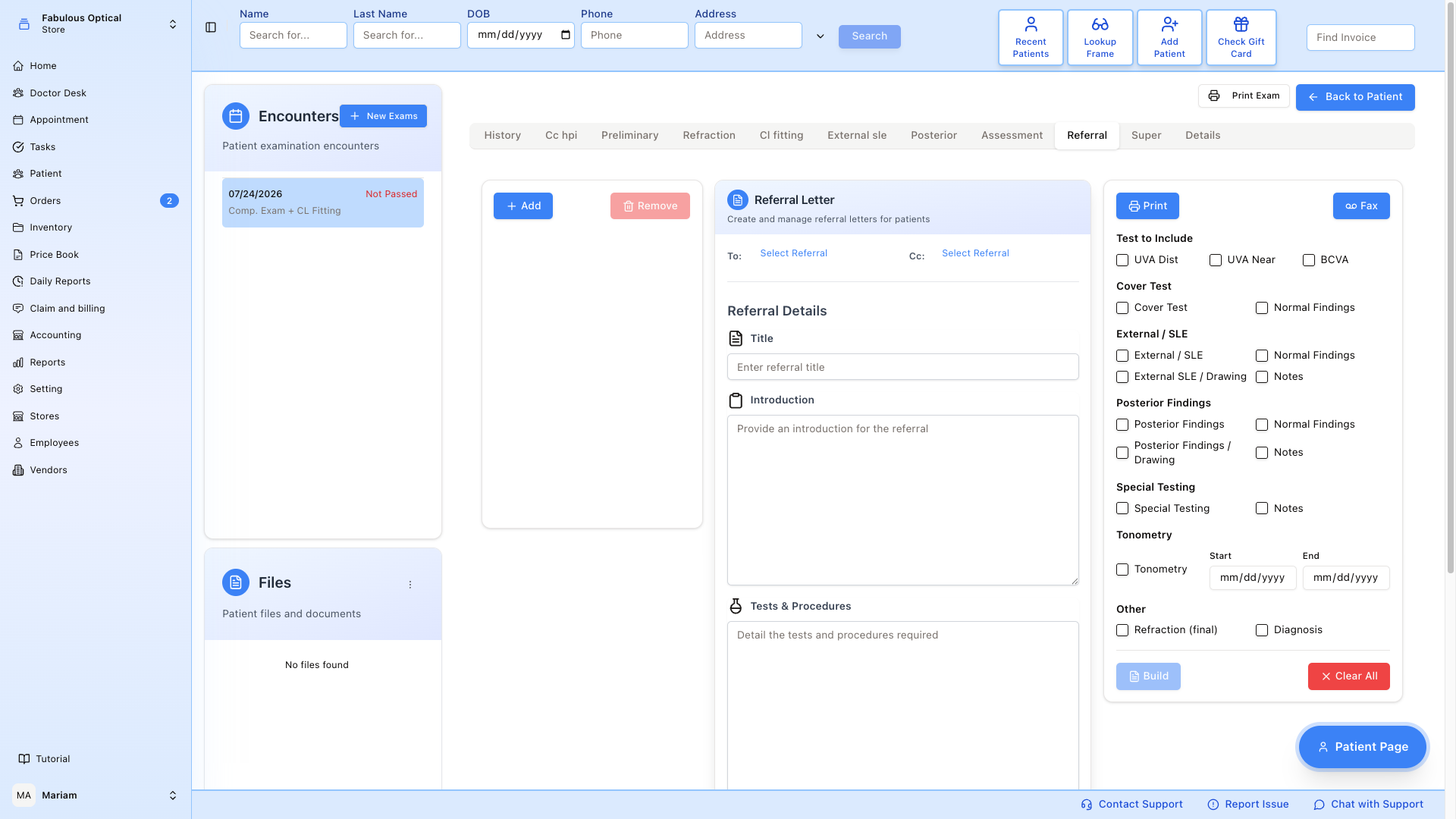
Send the patient to another doctor and print a referral letter.
- The letters list on the left holds the referral letters written for this exam, with Add to start another and Remove to delete the selected one (at once, no "are you sure?" step). The specialist is not chosen here — you pick them in the Addressing block, by clicking Select Referral next to To: or Cc:, which opens the referral-doctor picker.
- Addressing — where the letter goes.
- Referral Details — free-text Title, Introduction, Tests & Procedures and Clinical Issue: why you're referring and what you'd like the specialist to look at.
- Test to Include (right-hand panel) — tick which findings from this exam go into the letter, then press Build: SightHub writes them into the Tests & Procedures box, replacing what was there. Tonometry takes a Start and End date, so you can send a run of pressures rather than just today's. Clear All unticks everything. The built text is saved with the letter when you leave the tab.
Saving a letter
The open letter saves itself when you leave the tab (Referral has been updated). Two things to watch:
- A letter can only be saved once it has a doctor in To:. If you leave the tab with a letter open but no doctor chosen, you see Referral was not saved: select a letter and a doctor first — and the tab switches anyway, without saving what you typed. With no letter selected at all, anything typed in the form is simply dropped, without a message.
- Clicking a different letter in the list does not save the one you were editing. Finish a letter, click another exam tab to save it, then come back and open the next letter.
Once completed, Print opens the browser's print window for the letter. It prints the saved letter — save it first (switch tab and come back) if you have just changed it. There is also a Fax button, but faxing is not switched on — it answers with Fax sending is not configured yet.
The letter is not filed in the patient's documents automatically; print it and scan it back in if you need a copy on the record.
Set as Default marks the open letter as the default referral letter.