Exam — overview
An exam is one visit's clinical record: history, measurements, refraction, diagnosis, and everything else the doctor needs to fill in. Every exam has its own workspace with a row of tabs across the top — one tab per section.
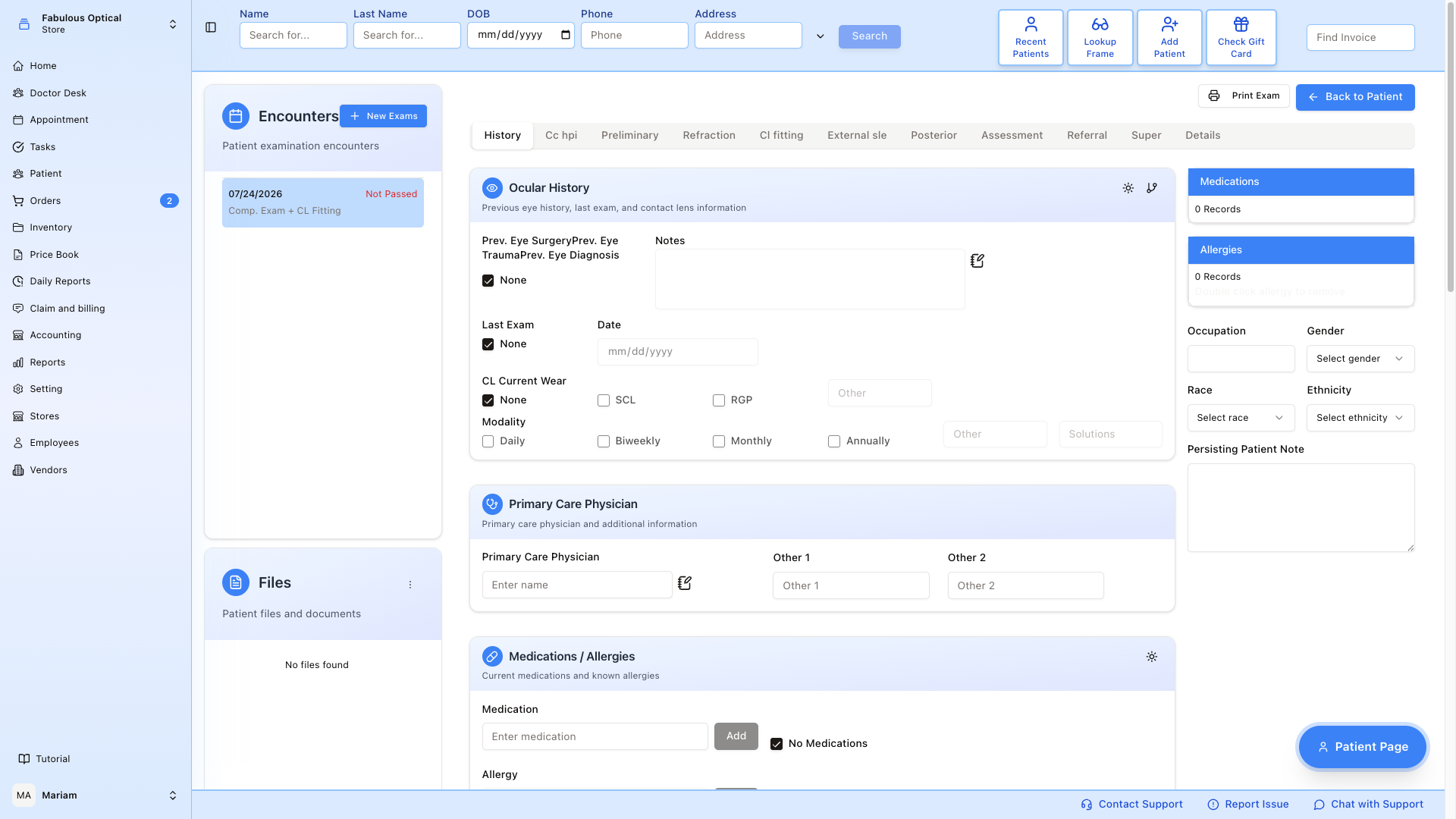
Layout
- Left column — the Encounters card lists this patient's exams, with the one you have open highlighted. + New Exams starts a fresh one. Below that is the Files card for scans and paper documents.
- Middle — the currently selected tab's form. It saves itself when you move to another tab — see How saving works below.
- Tab row — stays pinned to the top of the window while you scroll down a long tab, so you can jump to the next tab from anywhere on the page without scrolling back up.
- Right column — on the History tab only, a sidebar with Medications, Allergies, demographic quick-fields (Occupation / Gender / Race / Ethnicity), and a Persisting Patient Note. Switch to any other tab and this column disappears.
- Bottom-right — floating Patient Page button jumps to the front-desk patient card.
Tabs (in the order they appear)
| Tab | What goes in it |
|---|---|
| History | Ocular / family / social / ROS / meds / allergies / PCP. See History & CC/HPI. |
| Cc hpi | Chief complaint + HPI narrative. See History & CC/HPI. |
| Preliminary | VA, entrance Rx, pupils and motility, colour vision, blood pressure, autorefractor, keratometer. See Measurements. |
| Refraction | Retinoscopy → Cyclo → Manifest → Final glasses Rx. See Refraction. |
| Cl fitting | Contact lens trial → fitting → final Rx. See Contact lens fitting. |
| External sle | SLE (slit lamp), IOP/tonometry with chart, ocular perfusion pressure, gonio, drawing. See Measurements. |
| Posterior | Fundus findings, cup, notes. See Measurements. |
| Assessment | Diagnoses (ICD-10) + PQRS. See Assessment, Superbill & Referral. |
| Referral | Send patient to another doctor with a referral letter. See Assessment, Superbill & Referral. |
| Super | Superbill — procedures and invoice items generated from this exam. See Assessment, Superbill & Referral. |
| Details | The exam's doctor and type, Lock and Sign, Delete Exam, and the exam's Change history. |
The exact tabs shown depend on the exam type (a Comp. Exam has more tabs than a follow-up), but the ones listed above are the common set.
How saving works
There is no Submit button on the exam tabs. Each tab saves itself when you leave it:
- Type what you need on the tab.
- Click the next tab (or press Back to Patient in the header).
- If you changed anything, the tab row dims and shows Saving... for a moment. A green message such as History has been updated confirms the save, and the next tab opens.
- If you changed nothing, nothing is sent — the next tab opens straight away.
Nothing is saved while you stay on a tab — typing alone never saves. The save happens at the moment you leave.
If the save fails you stay on the tab, and everything you typed is still on the screen. Usually a red message says what went wrong. One case shows no message: on External SLE, a tonometry Type picked without its Day and Time — the tab simply does not change. Fix it and click the tab again.
What does NOT save the open tab:
- Clicking another exam in the Encounters list.
- The floating Patient Page button, or any item in the main menu.
- Closing the browser tab or reloading the page. Here the browser shows its standard changes may not be saved warning — choose to stay, then click another exam tab to save.
In all of these cases your unsaved changes on the open tab are lost. Make it a habit to click the next tab (or Back to Patient) before you go anywhere else.
Some things on a tab save immediately, without waiting for you to leave: adding or removing a medication or allergy, the sun icons on the ROS / Medical History, Social History and GMO cards of History (they save the whole History tab), Connect RX on Preliminary, the Ent. / A.R. / Ret. quick-fill buttons on Refraction, adding or removing a diagnosis, assessment or PQRS code on Assessment, everything on the Super tab, the Add button under Tonometry, the 1 Yr / 2 Yr buttons on CL Fitting (they save the whole tab), adding or removing a referral letter, and changing the doctor or exam type on Details.
A few tabs have their own rules about saving — the drawing on External SLE, the tonometry Day and Time, and the doctor on a referral letter. They are covered on each tab's page.
Copying from a previous visit
Most sections have a small icon in the card header that opens copy from a previous encounter. Pick an earlier exam on the left, tick the parts you want, and press Copy — the values come across into the exam you have open.
The copied values are only on the screen at first. They are saved like anything else you type — when you leave the tab.
Copy replaces the whole tab, not just the parts you ticked: sections you did not tick come out empty, even if you had already filled them in on this exam. So copy first, then type. If a copy wiped something you wanted, do not click another tab (that would save the wiped version) — reload the page instead and choose to leave without saving; the tab comes back as it was last saved.
It is on History, Chief Complaint / HPI, Preliminary, Refraction, External SLE, Posterior and CL Fitting, and it saves retyping a history that has not changed since last year.
Header actions
- Print Exam — opens a list of tick-boxes, one per section this exam has (from Medical History, Chief Complaint / HPI, Preliminary, Refraction, Contact Lens Fitting, External / SLE, Posterior, Assessment, Referral, Super) with Select All. Only Medical History is ticked to begin with, so tick what you actually want before pressing Print. The PDF opens in a new window — there is no preview step. The print uses what is saved: if you have just typed something on the open tab, click another tab first so it is saved, then print.
- Back to Patient — saves the open tab (same as switching tabs), then returns to the patient's medical chart. If the save fails, you stay in the exam.
Locking and signing the exam
When the exam is finished, the doctor locks and signs it on the Details tab.
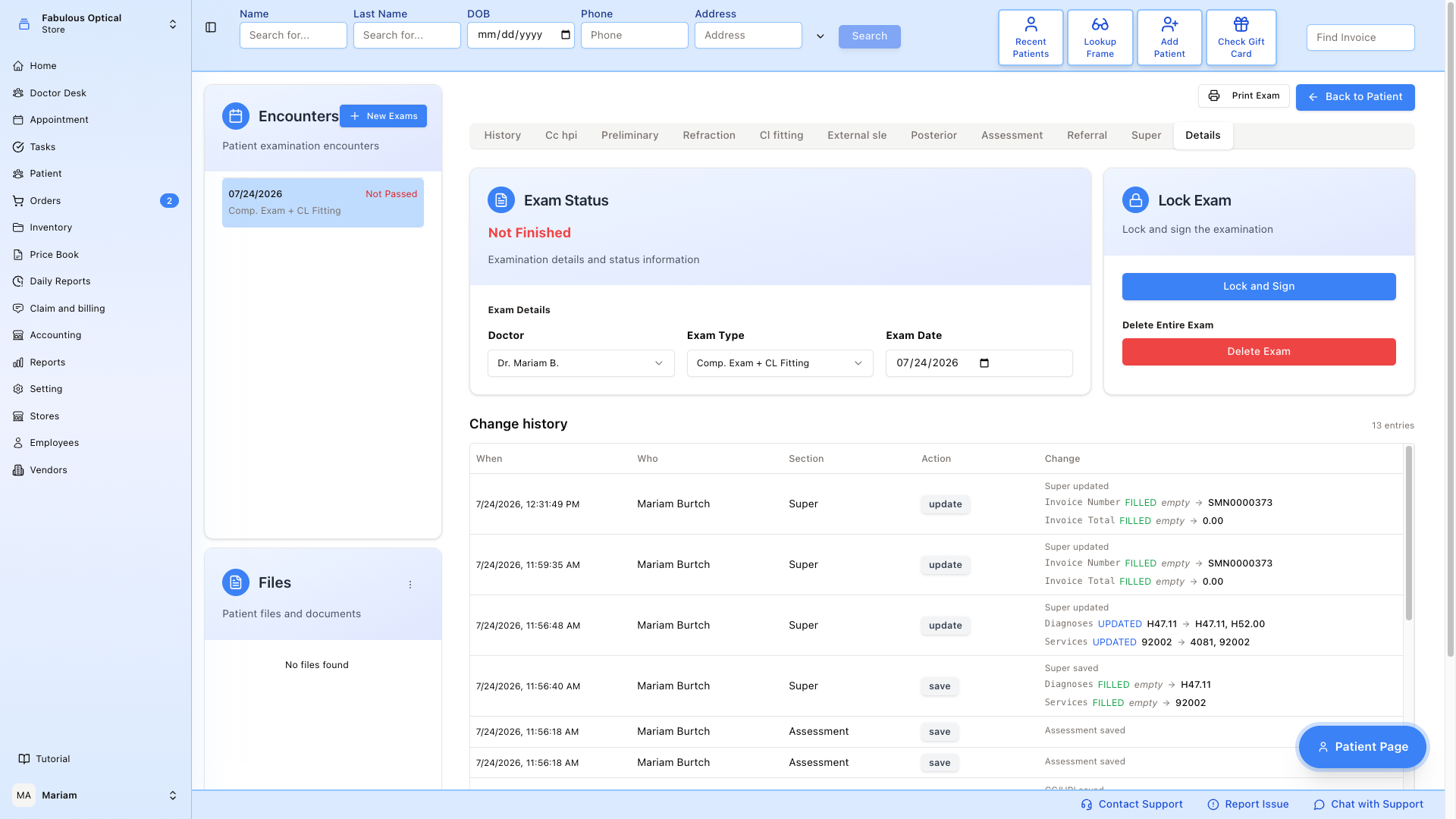
- Open the Details tab. Switching to it saves the tab you were on.
- Click Lock and Sign.
- A Lock and Sign Exam window opens and checks the super bill: every procedure on it must have diagnoses that support it. While it checks you see Validating super bill....
- What happens next depends on the result:
- All good (green) — a countdown Locking in 4… starts and the exam locks by itself when it reaches zero. Press Cancel during the countdown if you are not ready.
- All good, with warnings (amber) — the warnings are listed, but they do not block locking. The countdown runs the same way.
- Super bill is empty — nothing to validate. (amber) — there is nothing to check, so the countdown runs and the exam locks.
- Hey, look — something is off here. (red) — the exam is not locked. The window lists each procedure (CPT code and description) with its diagnoses, and the problems found under it. Press Close, fix the super bill on the Super tab, and try Lock and Sign again.
- Could not validate the super bill. Please try again. — the check itself failed; the exam is not locked.
- When the lock goes through you see Medical exam signed successfully.
Only the exam's own doctor (or an admin) can sign it. Anyone else gets an error message from the server and the exam stays open.
What a locked exam looks like
- The Details tab shows the status Finished (instead of Not Finished) and who signed it and when — Signed by name on date and time.
- In Encounters the exam shows Passed instead of Not Passed.
- The clinical tabs show Exam is passed — changes are not saved at the bottom. Most fields still look editable, but nothing you type is saved. The Super tab is the exception: it shows no such note and its buttons stay active.
- The button now reads Unlock, and Delete Exam reads Unlock to delete exam until the exam is unlocked.
To change a locked exam, press Unlock on Details, make the changes, and lock it again — the super bill check runs again.
The Details tab
- Doctor and Exam Type — change them from the drop-downs; the change is saved at once. Changing the type changes which tabs the exam shows.
- Exam Date — shown for reference. You can pick another date in the box, but it is not saved.
- Delete Exam — asks for a Reason (required), then Send for approval. When the deletion goes to a manager you see Sent to a manager for approval. You'll see it in Requests until it's decided. Until the manager decides, the exam is frozen: a This exam is pending deletion banner shows on every tab, nothing can be changed, Lock and Sign is greyed out and the delete button reads Deletion requested. Staff who cannot approve deletions see only the banner, without the exam's content. If the server deletes the exam straight away instead, you see Medical exam deleted successfully and land back on the patient's chart.
- Change history — a table of every change made to this exam: When, Who, Section, Action and Change (old and new value).
Working an exam start-to-finish
- Open the exam from Doctor's Desk → Unassigned Exams or from the patient's card.
- Work through the tabs left-to-right — most exams don't need every tab. Each tab saves when you click the next one.
- Build the super bill on the Super tab.
- Open Details and click Lock and Sign. If the super bill check finds problems, fix them and lock again.
Good to know
- Leave by the tabs. Clicking the next tab or Back to Patient is what saves. Jumping to another encounter or using the main menu does not.
- Stuck on a tab? If clicking another tab does nothing, read the message on screen — the save failed and SightHub is keeping you there so your work is not lost. On External SLE, check the drawing and the tonometry Day/Time (see Measurements).
- Print after you save. Print Exam and Print History print what is saved, not what is on the screen.
- The lock check is about the super bill only. It does not check whether every tab is filled in.