Patient Credit — who is holding a balance
Patient Credit is the third tab in the Patient area, next to Patient search and the Recall list. It answers one question: which patients are holding money at this location that has not been used yet.
Credit builds up when a patient overpays, when a return leaves money on the account, or when a payment is moved between invoices.
Reading the list
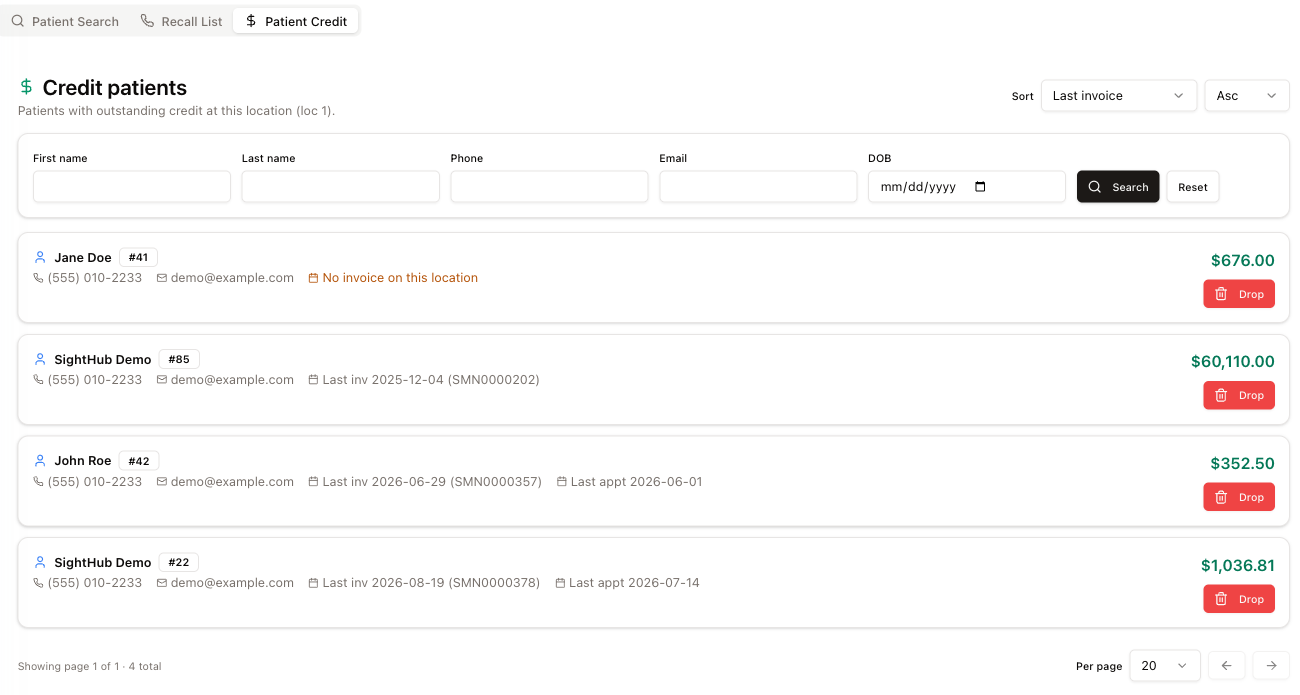
One card per patient: name, patient number, phone (the cell, else the work number, else the home number), email, and the credit balance in green on the right. Click the name to open that patient's card. Underneath the contact details you get the anchors that tell you whether the patient is still active — Last inv with the invoice number, and Last appt. A patient with nothing at this location shows No invoice on this location in orange.
The list only covers the location you are signed into.
Finding a patient
The search row filters by First name, Last name, Phone, Email and DOB — Search applies it, Reset clears it. Phone finds the patient by any of their numbers — cell, work or home.
Sort orders the list by Last invoice, Last appointment, Balance or Patient name, with Asc / Desc next to it. At the bottom you get the page count, a Per page selector (10, 20, 50 or 100) and arrows to move between pages.
Dropping a credit
Drop writes the balance off. It opens a confirmation first:
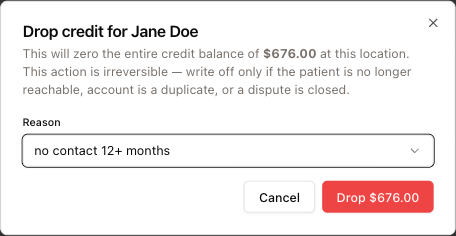
Read what it says: this zeroes the entire credit balance at this location, and it cannot be undone. Use it only when the credit genuinely should not exist any more — the patient is unreachable, the account is a duplicate, or a dispute has been settled.
Reason is required. The presets are no contact 12+ months, deceased, duplicate account, dispute resolved and other — picking other lets you type your own, up to 500 characters. The button repeats the amount being dropped, so you get one last look at the figure before you commit.
When Drop is greyed out
A patient with an appointment coming up cannot have their credit dropped. Their row carries an amber Upcoming appt badge, the contact line shows Next with the date, time and status of that appointment, and the Drop button is disabled — hovering it says Patient has upcoming appointment — don't drop yet.
That is deliberate: someone who is booked in is not unreachable, and the credit is about to be spent.