Sending claims electronically — TriZetto
SightHub files claims through TriZetto / Gateway EDI. A claim leaves as an 837P file dropped on TriZetto's SFTP server — there is no claim API — and the acknowledgements come back the same way. The same credentials also power the real-time eligibility check, which is a different thing on a different connection, so it can work when claim submission does not.
This page is about sending. Working the claim itself — statuses, superbill, payments — is on Claim and billing.
Before the first claim
Three things have to be in place first:
- The store's TriZetto credentials — Site ID and SFTP password, set per billing location in Integrations → TriZetto.
- The billing NPI and Tax ID for that store — the Type 2 (organization) NPI, not a doctor's, and the federal tax number. They are entered on the store itself, in Stores, where the fields are called Organization NPI and Tax Number. The TriZetto settings page reminds you with an amber box: a claim from a store missing either one is refused by the payer.
- The payer crosswalk — every insurance company mapped to its TriZetto Payer Id, in Settings → Integrations → TriZetto (the page links to it: Open the payer crosswalk). An unmapped company blocks its claims outright.
Until a location has its own Site ID, its claims are built on a shared test account and marked Test in the file header, which means they are generated correctly and never reach a real payer. Useful for rehearsing; useless for getting paid.
The claim panel
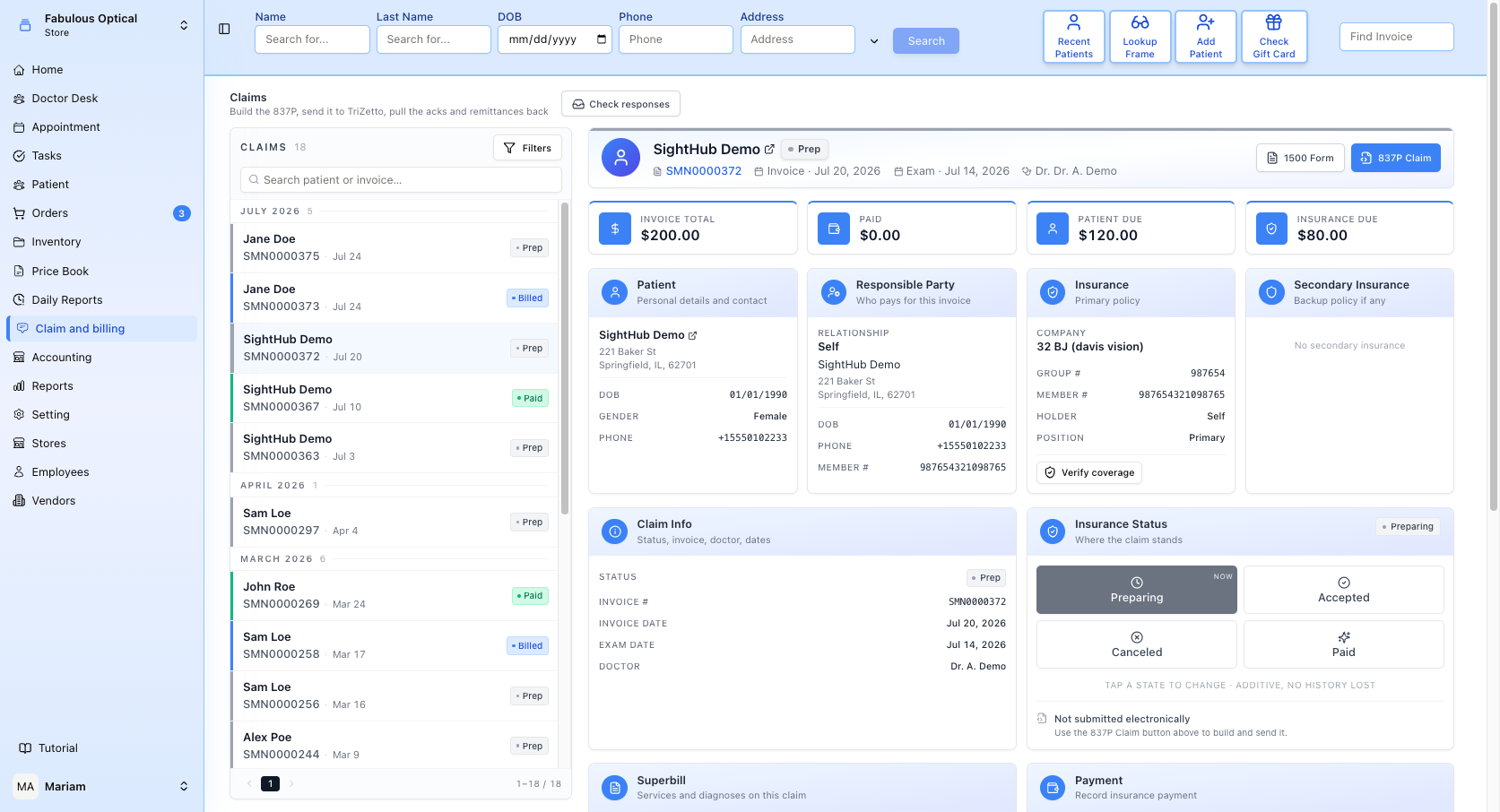
Two buttons at the top right of a claim decide how it goes out:
- 1500 Form — the paper route, the CMS-1500. See the CMS-1500 section.
- 837P Claim — the electronic route, this page.
Pick one. Sending the 837P and printing the CMS-1500 for the same invoice files the claim twice.
The Insurance Status card tells you whether the 837P has gone out. While nothing has gone out it reads Not submitted electronically — Use the 837P Claim button above to build and send it. Once sent it reads Submitted as 837P.
Building the 837P
837P Claim opens the file before it goes anywhere.
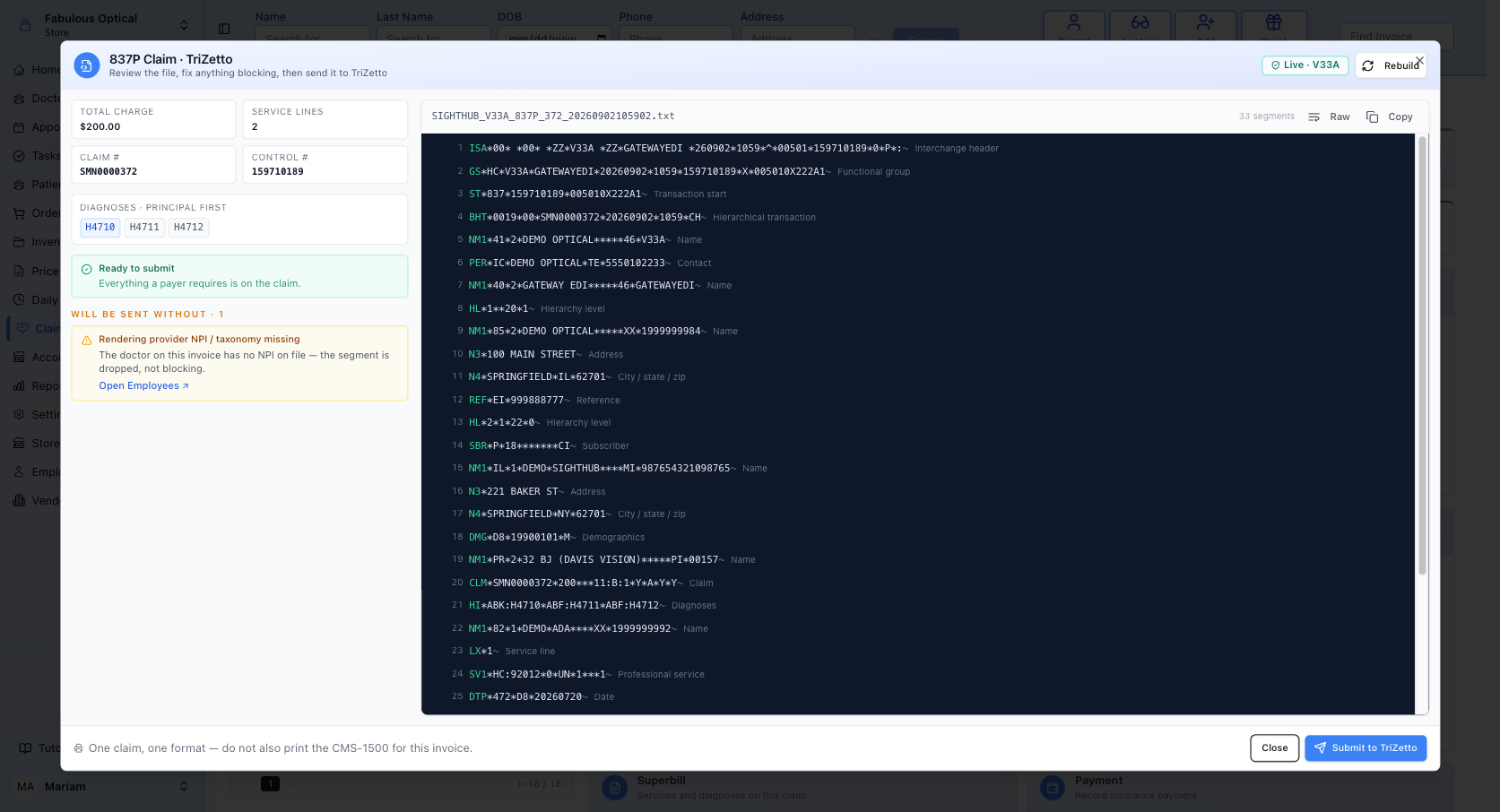
Left — is it sendable. Four tiles carry the numbers a payer matches on: Total charge, Service lines, Claim # (the invoice's own number, which is what you quote when chasing) and Control # (the interchange number, which is what TriZetto quotes back). Under them, the diagnoses in order, principal first — the order matters to the payer, and it comes from the exam's assessment.
Then the readiness list, and it separates two very different things:
- Blocking items stop the claim. Submit to TriZetto stays greyed out until every one is cleared. Each item says in plain words what is missing and, where there is a screen to fix it, links there — a missing practice NPI to Stores, an unmapped payer to the Payer Crosswalk, a missing member number or a missing policy to the patient's insurance. A missing service line or diagnosis has no link: fix it on the invoice or the superbill.
- Will be sent without items are warnings. The claim goes, but a segment is dropped. The example above — Rendering provider NPI / taxonomy missing — means the payer will not see which doctor performed the service (its link opens Employees, where the doctor's NPI goes). Legal to send, often a reason for a slow payment.
Green Ready to submit — Everything a payer requires is on the claim. — means there is nothing blocking.
Right — the actual file. The 837P as it will be sent, one segment per line, each annotated in grey with what it is (Interchange header, Subscriber, Service line…). Raw shows the file as one unbroken stream (Segments switches back), Copy puts the whole file on the clipboard, and the header shows the filename and segment count. You do not need to read EDI to use this, but when a payer says "your file is wrong at line 14", this is where you look.
Rebuild at the top regenerates the file from the current data — press it after fixing something rather than closing and reopening.
The badge next to it says which account built the file: green Live · … or amber Test · …, followed by the Site ID. On a test file an amber Test interchange box also explains that it will never reach a real payer.
Sending it
Submit to TriZetto asks for confirmation — Submit this claim to TriZetto? — showing the claim number, the charge, the line count and the Site ID. Send claim uploads it; Cancel backs out.
Success is explicit: Dropped in the claims folder, with the filename, and The invoice is now Billed. The button then reads Sent. That is the point of no return — the file is on TriZetto's server.
Two things can go wrong at this step and they are different:
- Claim is not complete — nothing was sent. The readiness check failed server-side. Nothing left the building.
- SFTP upload failed — the claim was not delivered. The file was fine; the connection was not. Retry.
If you open the window on an invoice that is already marked Billed, an amber warning appears — This invoice is already marked Billed. Sending again files a duplicate at the payer. Only do it when the first attempt failed in transport and never reached TriZetto.
Pulling the answers back — Check responses
TriZetto does not push anything. Check responses, above the claims list, goes and looks in the mailbox for you.
Three kinds of file come back:
- 999 — TriZetto accepted or rejected the file (was the EDI well-formed).
- 277CA — the payer accepted or rejected the claim (did it pass their front-end edits).
- 835 — the remittance: what they actually paid, and what they took off.
Anything found is matched to its claim and moves that claim's status. The toast says how much arrived — 4 response file(s) ingested · 3 matched to a claim — or Nothing new from TriZetto.
After a check, View last run next to the button opens a small panel with the Site ID, the counts (files ingested, response rows, matched) and a line per mailbox folder showing new / total and any that failed to parse.
There is a 30-minute cooldown. Once you have checked, the button greys out and shows next in 24 min; after that it shows Last checked …. The cooldown is remembered by this browser, not by the server — please do not get round it from another computer: TriZetto asks for at most about one connection an hour, and payers answer in hours, not seconds, so checking more often finds nothing anyway.
The check runs for your own location's mailbox. If it answers No TriZetto Site ID for your location, the store has no credentials — go back to Settings. Could not reach the TriZetto SFTP server is a connection problem, not a claim problem.
Verify coverage — the real-time check
The eligibility check (270/271 in EDI terms) asks the payer, live, whether this member is covered right now. It sits in two places:
- Verify coverage on the Insurance card of a claim, so the biller can check before sending.
- Verify coverage in the Coverage check box on the patient's insurance page, on the policy itself, so the front desk can check before the visit.
The answer comes back as a small coloured card. Read it as two separate questions:
Did the payer answer at all? If something other than a plain success comes back, the card shows the gateway's own outcome and a hint about it. A payer you are not enrolled with, or a payer id that is wrong, answers here — and that is not the same as the patient being uninsured.
Is this member covered? Only asked once the payer has answered. Green for active coverage, red for none, and where the payer supplies them, Copay and Deductible on the line underneath. Show benefits expands the raw benefit lines the payer sent (Hide benefits folds them away).
The footer of the card carries the time it was checked, the payer id used, and an amber test account flag when the answer came from the shared test credentials rather than the store's own — a test answer tells you the plumbing works, nothing about the patient.
The result is stored on the policy, so opening the policy on the patient's insurance page later still shows the last answer and when it was taken. The card inside a claim shows only a check run there and then.
When it will not run:
- Eligibility request is incomplete lists exactly which fields are missing — member number, date of birth, payer mapping. Each one is something a person has to go and fill in; the request is not even built until they are there.
- You don't have permission to run an eligibility check — the patient-side check needs the insurance-update permission. The one inside a claim does not.
- Could not reach TriZetto — connection, not coverage.