Doctor's Desk — overview
Doctor's Desk is the doctor's home screen inside SightHub. It shows what the doctor needs to do right now: who's on the schedule today, quick patient lookup, any exams still waiting to be finished, and pharmacies waiting for the doctor's answer.
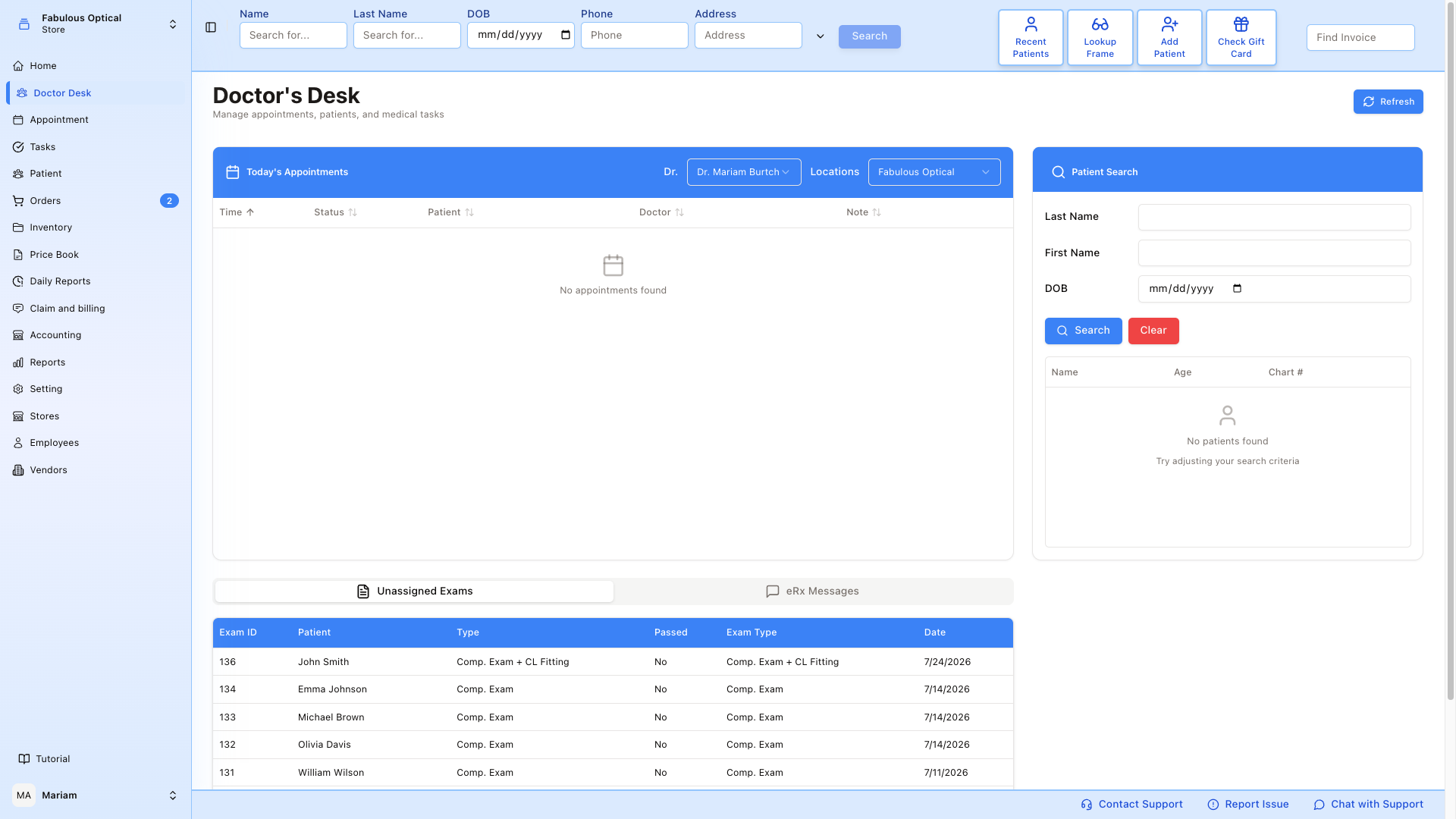
What's on the page
Today's Appointments (top-left)
The list of the selected doctor's appointments for the current day. Columns: Time · Status · Patient · Doctor · Note.
Two dropdowns at the top let you switch:
- Dr. — pick the doctor whose calendar you want to see. It opens on you if you are a doctor at the chosen store, otherwise on the first doctor in the list.
- Locations — picks which store's doctors appear in the Dr. list. It starts on your own store. It does not filter the appointments themselves: changing the store switches the Dr. dropdown to a doctor of that store, and the table shows that doctor's day.
Click the patient's name to open their medical chart. The Status badge is a dropdown — change it here and it saves straight away — and every column heading sorts (click again to reverse, a third time to go back to sorting by time). Empty state ("No appointments found") means the selected doctor has nothing booked today.
Patient Search (right)
Quick lookup by Last Name / First Name / DOB. Click Search (or press Enter in any field) to run; Clear empties the fields but leaves the last results in the table. Results appear in the table below with the columns Name · Age · Chart # — the third column is headed Chart # but currently prints the patient's address. Click a result to open that patient's medical chart.
For the full search page with all filters and CSV export, use Patient → Patient Search.
Unassigned Exams (bottom-left)
Exams that were started but haven't been signed off yet. Columns: Exam ID · Patient · Type · Passed · Exam Type · Date. Type and Exam Type currently show the same value (the exam type); Passed reads Yes or No. An exam waiting for a manager to approve its deletion carries a Pending deletion tag. The Dr. dropdown above does not filter this list.
Click a row → jumps straight into that exam's exam workspace, opening on the first section for that exam type.
Pharmacy Requests (bottom-right)
Pharmacies asking to refill or change a prescription. Every request needs the doctor's own answer, and the pharmacy network expects it within 48 hours.
- By default the card shows only requests Waiting for an answer, with a counter next to the title. The list at the top switches to Answered, Withdrawn by the pharmacy, Asked again, Expired or All.
- Each row shows the kind of request, the drug, the patient, the pharmacy, how long ago it came and the answer by deadline. A request still waiting after 48 hours turns red (over 48 h).
- Open opens the request so you can read it and answer; View shows one that is already closed.
- The small round-arrow button next to the list reloads just this card.
Step by step: Pharmacy requests — refills and changes.
The old eRx Messages tab next to Unassigned Exams is gone — pharmacy messages live in this card now.
Header actions
- Refresh — pull the latest appointments, exams and pharmacy requests from the server without reloading the whole page.